 Vectode
UPC barcodes in Adobe Illustrator
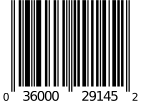
UPC-A is the standard retail barcode in the United States and Canada; UPC-E is its compressed form for small packages. Vectode generates both as true vector paths directly on your Illustrator artboard, ready for professional print.
How to insert it in Illustrator
- Open the Vectode panel (Window ▸ Extensions ▸ Vectode) or the standalone app.
- Choose UPC-A (or UPC-E) and type your number — the check digit is computed and verified automatically.
- Pick a size and click Insert. The barcode is placed as editable vector paths with proper quiet zones and OCR-B text.
What Vectode gets right
- UPC-A: 12 digits (11 + check digit, computed automatically)
- UPC-E: compressed 8-digit form of UPC-A (zero suppression) for small packages
- Same bar geometry family as EAN-13 — scannable worldwide
- Standard magnification range 80–200 %, quiet zones included automatically
- Human-readable digits in OCR-B
Frequently asked questions
What is the difference between UPC and EAN?
UPC-A is the 12-digit retail code used in the US and Canada; EAN-13 is the 13-digit international version. Technically they share the same bar structure — an EAN-13 starting with 0 contains a UPC-A. Which one you need is decided by your retailer and your GS1 prefix.
When should I use UPC-E?
UPC-E is a compressed version of UPC-A for very small packages. It can only be built from UPC-A numbers with a specific pattern of zeros — Vectode tells you when your number cannot be compressed.
One-time payment. 14-day money-back guarantee. VAT handled at checkout.
More codes in Vectode: EAN-13 & EAN-8 · GS1 DataMatrix · Data Matrix & Aztec · Pharma codes (PPN, SÚKL) · all features →